
Last Updated: 12/22/2025 @ 18:27:32
💅 How to Make Dope Slides
slides
revealjs
style
Details of how I create my slides, with Quarto + Reveal.js
Quarto 🤝 Reveal.js
So, after making a promise some time ago on twitter 1, and having many questions following my talk on Parallel Training Techniques last week, I’m finally getting around to writing this up.
The slides are written using Quarto, a flavor of Markdown, and uses the built-in Quarto + Reveal.js functionality.
For this post, I’ll focus on the slides I presented at last years Lattice 2023, shown below:
Getting Started
Whenever I give a talk, my workflow is typically:
Create new GitHub repo for it
Hunt down the GitHub repo from my last talk and2:
Honestly, other than that, 90% of the work is done automatically by Quarto. The remaining 10% consists of figuring out why my css is broken (see CSS).
The best place to start for learning to make slides with Quarto and Reveal.js is the official documentation:
The slides are written in
markdownQuarto (.qmd)3, a pandoc-compliant based markup language.For a single slide deck, the content will be placed in
index.qmdand our directory structure will look something like:📂 lattice23/ ├── 📂 assets/ # for images, etc. │ └── 🖼️ thumbnail.png # can be used as social preview image ├── 📂 css/ │ ├── 📄 callouts.css │ ├── 📄 dark.scss │ └── 📄 default.css ├── 🛠️ _quarto.yml # Configuration goes here ├── 📄 index.qmd # Quarto document containing slides content └── 📜 references.bib # BibTex referencesEquations are rendered using
$delimiters for inline math and$$for display math4.We can use Divs and Spans from Pandoc.
<span>’s: are created by wrapping text in square brackets, and will be treated as a<span>with attributes if it is followed immediately by attributes, e.g.:Example:
[This is *some text*]{.class key="val"}idk what I’m doing really, so I mostly find myself doing things like
[blue text]{style="color:#1E88E5;"}which produces blue text.
<div>’s: are created by wrapping text with a line consisting of at least three colons:::.Example:
We can use either attributes in curly braces or a single unbraced word, which will be treated as a class name.
🎁 Install Extensions
Find the full list of available extensions at Quarto Extensions
To install various icon sets used in the example slides, we can install the following extensions:
$ quarto install extension mcanouil/quarto-iconify      # https://icones.js.org/ [<-- Contains rest of icon sets ??]
$ quarto install extension shafayetShafee/bsicons       # bootstrap icons
$ quarto install extension schochastics/academicicons   # OrcID, Google Scholar, ...
$ quarto install extension quarto-ext/fontawesome       # Font Awesome icons
note that these aren’t necessary for functionality, but provide additional icons that I like to use 🤷🏻♂️
Metadata
The first section of our index.qmd contains the YAML metadata for the Quarto document.
Explicitly, we see this consists of:
Expand for yaml
---
format:
  revealjs:
    title-block-style: none
    slide-number: c
    title-slide-style: default
    chalkboard:
      buttons: false
    auto-animate: true
    reference-location: section
    touch: true
    pause: false
    footnotes-hover: true
    citations-hover: true
    preview-links: true
    controls-tutorial: true
    controls: false
    logo: "https://raw.githubusercontent.com/saforem2/anl-job-talk/main/docs/assets/anl.svg"
    history: false
    theme: [dark, css/dark.scss]
    css: [css/default.css, css/callouts.css]
    self-contained: false
    embed-resources: false
    self-contained-math: false
    center: true
    highlight-style: "atom-one"
    default-image-extension: svg
    code-line-numbers: true
    code-overflow: scroll
    html-math-method: katex
    fig-align: center
    mermaid:
      theme: dark
  gfm:
    output-file: "lattice23.md"
---
The complete list of Reveal.js options are listed, with descriptions at: Quarto – Revealjs Options
Title Slide
Starting with the title slide5:

Figure 1: Title Slide The full slide contents are included below:
Expand for
quarto# {.title-slide .centeredslide background-iframe="https://saforem2.github.io/grid-worms-animation/" loading="lazy"} ::: {style="background-color: rgba(22,22,22,0.75); border-radius: 10px; text-align:center; padding: 0px; padding-left: 1.5em; padding-right: 1.5em; max-width: min-content; min-width: max-content; margin-left: auto; margin-right: auto; padding-top: 0.2em; padding-bottom: 0.2em; line-height: 1.5em!important;"} [MLMC: Machine Learning Monte Carlo]{.style="color:#939393; font-size:1.5em; font-weight:bold;} [for Lattice Gauge Theory]{style="color:#777777; font-size:1.2em; font-weight: bold;"} [<br> ]{style="padding-bottom: 0.5rem;"} [](https://samforeman.me) Sam Foreman [Xiao-Yong Jin, James C. Osborn]{.dim-text style="font-size:0.8em;"} [[[ `saforem2/`](https://github.com/saforem2/)]{style="border-bottom: 0.5px solid #00ccff;"}`{`[[`lattice23`](https://github.com/saforem2/lattice23)]{style="border-bottom: 0.5px solid #00ccff;"}, [[`l2hmc-qcd`](https://github.com/saforem2/l2hmc-qcd)]{style="border-bottom: 0.5px solid #00ccff;"}`}`]{style="font-size:0.8em;"} ::: ::: footer [2023-07-31 @ [Lattice 2023](https://indico.fnal.gov/event/57249/contributions/271305/)]{.dim-text style="text-align:left;'} :::For the background, I made a simple animation
saforem2/grid-worms-animationthat is hosted on GitHub pages as a simple html websiteThis static GitHub page is then used as an IFrame Background natively in Quarto with Reveal.js
This is as simple as:
Single-Column Slides
Other than the title slide, the remainder of the slides are all relatively straightforward to construct.
For single-column slides, constructing the content is as simple as writing it in Markdown:
# Overview

1. [Background: `{MCMC,HMC}`](#markov-chain-monte-carlo-mcmc)
    - [Leapfrog Integrator](#leapfrog-integrator-hmc)
    - [Issues with HMC](#sec-issues-with-hmc)
    - [Can we do better?](#sec-can-we-do-better)

2. [L2HMC: Generalizing MD](#sec-l2hmc)
    - [4D $SU(3)$ Model](#sec-su3)
    - [Results](#sec-results)
3. [References](#sec-references)
4. [Extras](#sec-extras)
Centered Slides
We can center all the text on a slide by adding the {.centeredslide} class to the slide header, e.g.
Multi-Column Slides
Side-by-side content (either text or images)

This slide is horizontally centered6 and the content consists of two rows split as follows:
| A | B |
| C | C |
In panel A, we have a
::: {.callout-note}block followed by a single list element containing a LaTeX equation.In panel B we have a standard markdown image
In panel C we have normal text + math with LaTeX7 syntax.
Note that we additionally have a
::: footerelement included at the bottom of the slide.The code used to generate the slide above is included below:
Expand for
quarto# Markov Chain Monte Carlo (MCMC) {.centeredslide} :::: {.columns} ::: {.column width="50%"} ::: {.callout-note title="Goal" style="text-align:left;!important"} Generate **independent** samples $\{x_{i}\}$, such that[^notation] $$\{x_{i}\} \sim p(x) \propto e^{-S(x)}$$ where $S(x)$ is the _action_ (or potential energy) ::: - Want to calculate observables $\mathcal{O}$: $\left\langle \mathcal{O}\right\rangle \propto \int \left[\mathcal{D}x\right]\hspace{4pt} {\mathcal{O}(x)\, p(x)}$ ::: ::: {.column width="49%"} 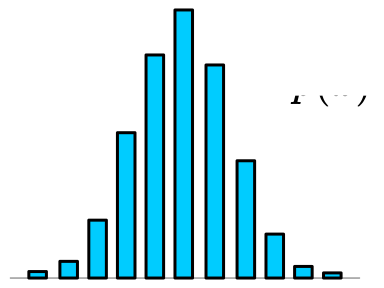 ::: :::: If these were [independent]{.style="color:#00CCFF;"}, we could approximate: $\left\langle\mathcal{O}\right\rangle \simeq \frac{1}{N}\sum^{N}_{n=1}\mathcal{O}(x_{n})$ $$\sigma_{\mathcal{O}}^{2} = \frac{1}{N}\mathrm{Var}{\left[\mathcal{O} (x) \right]}\Longrightarrow \sigma_{\mathcal{O}} \propto \frac{1}{\sqrt{N}}$$ [^notation]: Here, $\sim$ means "is distributed according to" ::: footer [ `saforem2/lattice23`](https://saforem2.github.io/lattice23) :::
💅 CSS
My web developer friend laughs at me, but when something is broken / doesn’t look right / I want it to look different, I:
- Pull up Chrome Tools ( ⌘ + ⌥ + I )
- Inspect element of interest ( ⌘ + ⇧ + C )
- Make changes to the CSS
- Save the new rule to my
.scssfile 🤷🏻♂️
I’m guessing this might be obvious to some people, but it took me a while to figure out how things worked so maybe its helpful for others.
Expand for css

📃 GitHub Page
To enable your GitHub page, you can do the following:

docs/ directory off the main branch.
In this case, the repo is:
and the site is published at
📓 References
Footnotes
And countless other people IRL↩︎
One thing I’ve been meaning to do, is clean up all my
css/*files and move them all to a single repository, but I’ll save that for another day.↩︎An open-source scientific and technical publishing system↩︎
Quarto comes with lightbox support, so you can click on images to display them full screen.↩︎
By adding the
{.centeredslide}class to the slide header↩︎Text surrounded by
$will be rendered with LaTeX↩︎
Citation
BibTeX citation:
@online{foreman2024,
  author = {Foreman, Sam},
  title = {How to {Make} {Dope} {Slides}},
  date = {2024-08-13},
  url = {https://samforeman.me/posts/dope-slides},
  langid = {en}
}
For attribution, please cite this work as:
Foreman, Sam. 2024. “How to Make Dope Slides.” August 13,
2024. https://samforeman.me/posts/dope-slides.