Training Foundation Models on Supercomputers
Sam Foreman
@ 2025 ALCF Hands-on HPC Workshop
2025-09-24
👀 Scaling: Overview
- ✅ Goal:
- Minimize: Cost (i.e. amount of time spent training)
- Maximize: Performance
📑 Note
See 🤗 Performance and Scalability for more details
🐢 Training on a Single Device
- See also:
👬 Training on Multiple GPUS: Data Parallelism
➡️ Data Parallel: Forward Pass
⬅️ Data Parallel: Backward Pass
🔄 Data Parallel: Training
- Each GPU:
- has identical copy of model
- works on a unique subset of data
- Easy to get started (minor modifications to code):
📡 Communication
- Requires global communication
- every rank must participate (collective communication) !!
- Need mechanism(s) for communicating across GPUs:
- Collective Communication:
⌛ Timeouts
- Collective operations have to be called for each
rankto form a complete collective operation.- Failure to do so will result in other ranks waiting indefinitely
🚧 Common Pitfalls
- Each worker needs to be fed a unique batch of data at each step
- Only perform File I/O on one worker (i.e.
rank==0)- When loading from a checkpoint, read in on one worker and broadcast to others
- Collective operations must be called by all workers
- Ensure that all workers are using the same version of code / libraries
RANK==0 and broadcast
🎀 Best Practices
- Use parallel IO whenever possible
- Feed each rank from different files
- Use MPI IO to have each rank read its own batch from a file
- Use several ranks to read data, MPI to scatter to remaining ranks
- Most practical in big at-scale training
- Take advantage of data storage
- Use the right optimizations for Aurora, Polaris, etc.
- Preload data when possible
- Offloading to a GPU frees CPU cycles for loading the next batch of data
- minimize IO latency this way
- Offloading to a GPU frees CPU cycles for loading the next batch of data
⏰ Keeping things in Sync
Computation stalls during communication !!
Keeping the communication to computation ratio small is important for effective scaling.
🤔 Plan of Attack
🚀 Going Beyond Data Parallelism
- ✅ Useful when model fits on single GPU:
- ultimately limited by GPU memory
- model performance limited by size
- ⚠️ When model does not fit on a single GPU:
- Offloading (can only get you so far…):
- Otherwise, resort to model parallelism strategies
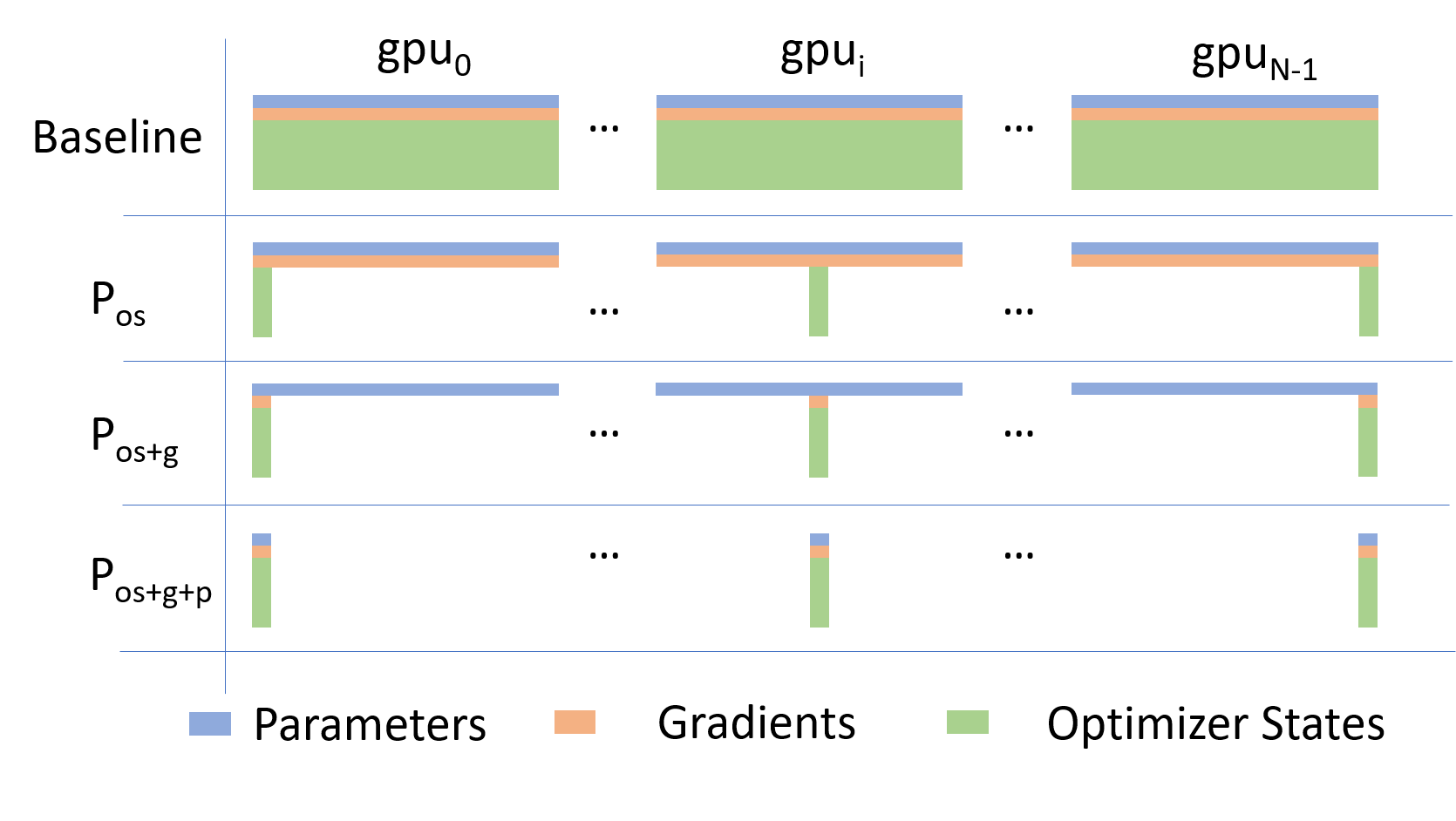
Going beyond Data Parallelism: ZeRO
- Depending on the
ZeROstage (1, 2, 3), we can offload:- Stage 1: optimizer states \left(P_{\mathrm{os}}\right)
- Stage 2: gradients + opt. states \left(P_{\mathrm{os}+\mathrm{g}}\right)
- Stage 3: model params + grads + opt. states \left(P_{\mathrm{os}+\mathrm{g}+\mathrm{p}}\right)
🕸️ Additional Parallelism Strategies
- Tensor (/ Model) Parallelism (
TP): - Pipeline Parallelism (
PP): - Sequence Parallelism (
SP): -
- Supports 4D Parallelism (
DP+TP+PP+SP)
- Supports 4D Parallelism (
Pipeline Parallelism (PP)
- Model is split up vertically (layer-level) across multiple GPUs
- Each GPU:
- has a portion of the full model
- processes in parallel different stages of the pipeline (on a small chunk of the batch)
- See:
Tensor Parallel (TP)
- Each tensor is split up into multiple chunks
- Each shard of the tensor resides on its designated GPU
- During processing each shard gets processed separately (and in parallel) on different GPUs
- synced at the end of the step
- See: 🤗 Model Parallelism for additional details
Tensor Parallel (TP)
- Suitable when the model is too large to fit onto a single device (CPU / GPU)
- Typically more complicated to implement than data parallel training
- This is what one may call horizontal parallelism
- Communication whenever dataflow between two subsets
-
argonne-lcf/Megatron-DeepSpeed - 🤗
huggingface/nanotron
Tensor (/ Model) Parallel Training: Example
Want to compute: y = \sum_{i} x_{i} W_{i} = x_0 * W_0 + x_1 * W_1 + x_2 * W_2
where each GPU only has only its portion of the full weights as shown below
- Compute: y_{0} = x_{0} * W_{0}\rightarrow
GPU1 - Compute: y_{1} = y_{0} + x_{1} * W_{1}\rightarrow
GPU2 - Compute: y = y_{1} + x_{2} * W_{2} = \sum_{i} x_{i} W_{i} ✅
🧬 MProt-DPO: Scaling Results
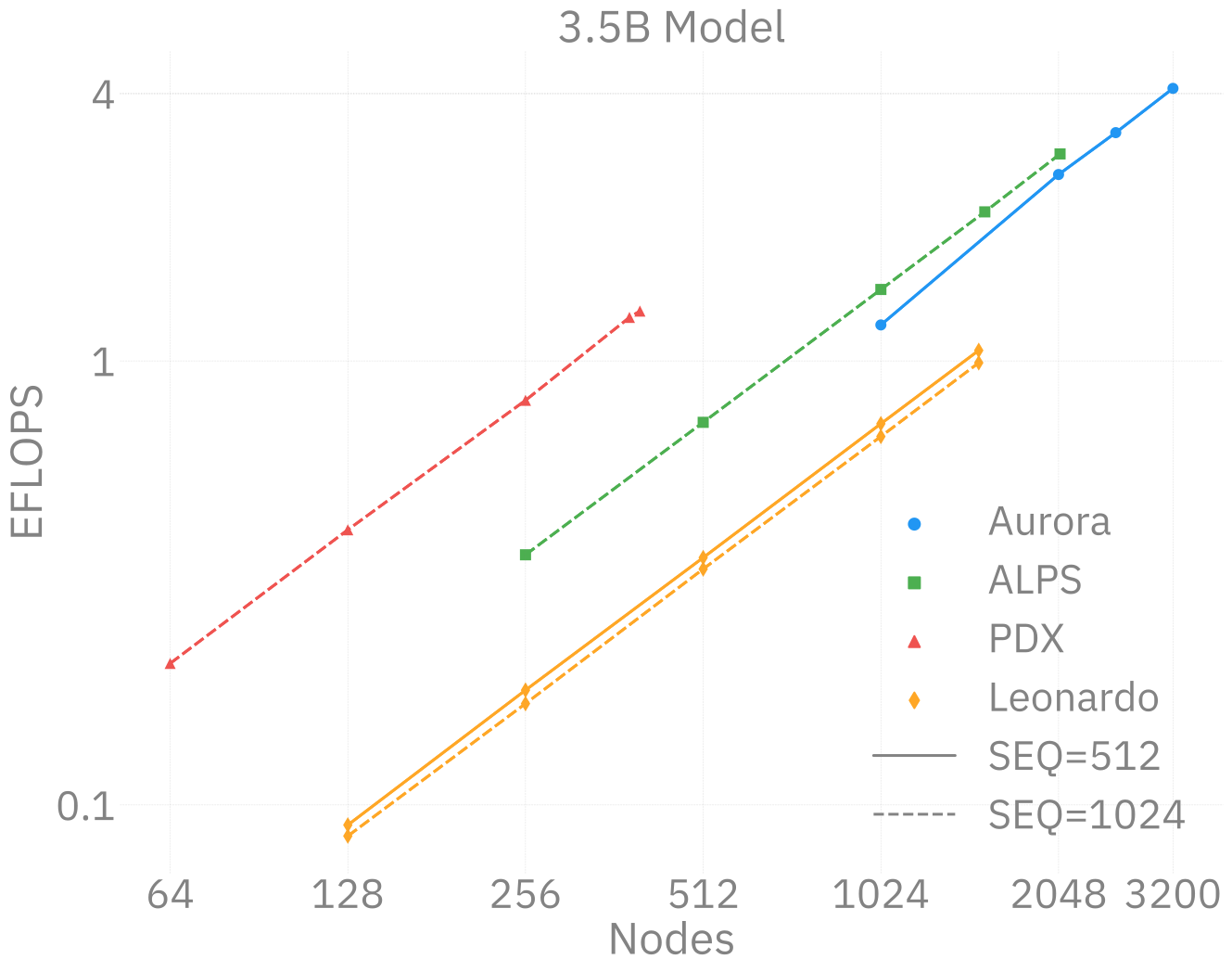
3.5B model across ~38,400 GPUs
~ 4 EFLOPS @ Aurora
38,400 XPUs
= 3200 [node]
x 12 [XPU / node]🔔 2024 ACM Gordon Bell Finalist (Dharuman et al. (2024)):
MProt-DPO: Breaking the ExaFLOPS Barrier for Multimodal Protein Design Workflows
🌎 AERIS: Scaling Results
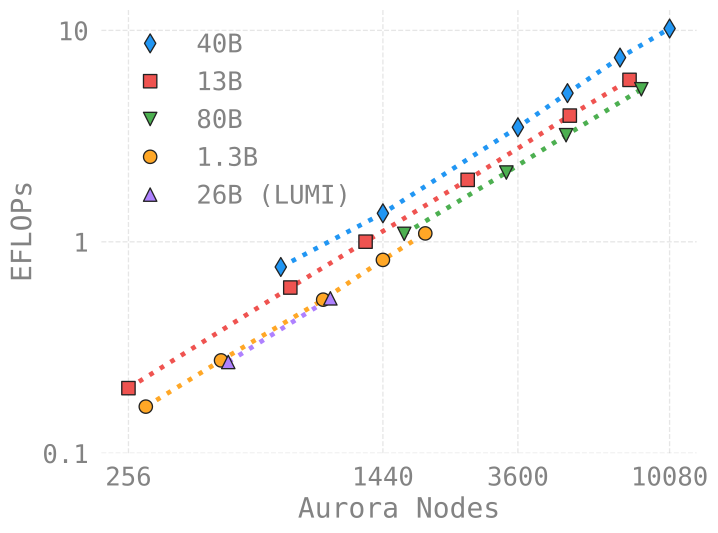
AERIS: Scaling Results
- 10 EFLOPs (sustained) @ 120,960 GPUs
- See (Hatanpää et al. (2025)) for additional details
- arXiv:2509.13523
🍋 ezpz
Write once, run anywhere
Setup (optional1):
Install:
See also:
🍋 ezpz @ ALCF
Polaris:
uv venv --python=3.12
source .venv/bin/activate
module use /soft/modulefiles
module load gcc-native cudatoolkit/12.8.1
uv pip install
uv pip install --no-cache --link-mode=copy torch torchvision torchaudio transformers deepspeed datasets accelerate torchinfo
CC=mpicc CXX=mpicxx uv pip install --no-cache --link-mode=copy --no-binary=mpi4py mpi4py
uv run --with "git+https://github.com/saforem2/ezpz@saforem2/tests" --with "numpy<2" ezpz-test
🐣 Getting Started
Submit interactive job:
Source1 the
ezpz/bin/utils.shscript (usingcurlto download it2):
🏖️ Shell Environment
Setup environment:
🔍 Environment Setup with ezpz_setup_env
- Wrapper around
ezpz_setup_job&&ezpz_setup_python
ezpz_setup_job: Determine the specifics of our active (PBS, SLURM) job1ezpz_setup_python:- if @ ALCF:
- Load the appropriate modules and activate base
condaenv
- Load the appropriate modules and activate base
- else:
- Look for an active
condaenvironment- If found, use it to build a new virtual environment
- Look for an active
- Activate the newly created
venvs/$(basename ${CONDA_PREFIX})environment
- if @ ALCF:
⏱️ Working with Job Scheduler(s)
ezpzintegrates directly with your favorite job scheduler (PBS, slurm)- has mechanisms for getting information about our currently running jobs
- 🪄 Automagically:
- Determine the specifics of our active (PBS, SLURM) job
(e.g.${NHOSTS},${NGPU_PER_HOST},${NGPUS}, …) - Load the appropriate modules1
- Create (or activate) a virtual environment on top of a base conda environment
- Determine the specifics of our active (PBS, SLURM) job
🐍 Python Environments
- ALWAYS work inside a virtual environment
- best practice is to maintain separate virtual environments for:
- each project you work on
- different versions of a specific package you’re working with
e.g you would want different envs fortorch==2.Xvstorch==2.Y
- Mangled python environments are one of the most common issues faced by users
- best practice is to maintain separate virtual environments for:
🧪 Simple Distributed Test
Run distributed test:
Launch any python from python
Launch a module:
Launch a python string:
➕ How to Modify Existing Code
✨ Features
Initializing PyTorch across multiple processes
Automatic device detection (
xpu,cuda,mps,cpu, …)Automatic (single-process) logging
Distributed debugger:
🧪 Experiment Tracking
import ezpz
rank = ezpz.setup_torch()
logger = ezpz.get_logger(__name__)
if rank == 0:                   # -- [1.] --
    try:
        _ = ezpz.setup_wandb(
            "ezpz.examples.minimal"
        )
    except Exception:
        logger.exception(
            "Failed to initialize wandb, continuing without it"
        )

# ...build {model, optimizer}, etc...

for i in range(train_iters):
    metrics = train_step(...)
    logger.info(                 # -- [2.] --
        history.update(metrics)  # -- [3.] --
    )

if rank == 0:
history.finalize()- Initialize W&B (if
WANDB_DISABLEDis not set) - Log summary of metrics to stdout
- Update
history.historywith metrics1
🤏 Minimal Example
import os
import time
import ezpz
import torch

logger = ezpz.get_logger(__name__)


class Network(torch.nn.Module):
    def __init__(
        self,
        input_dim: int,
        output_dim: int,
        sizes: list[int] | None,
    ):
        super(Network, self).__init__()
        nh = output_dim if sizes is None else sizes[0]
        layers = [torch.nn.Linear(input_dim, nh), torch.nn.ReLU()]
        if sizes is not None and len(sizes) > 1:
            for idx, size in enumerate(sizes[1:]):
                layers.extend(
                    [torch.nn.Linear(sizes[idx], size), torch.nn.ReLU()]
                )
            layers.append(torch.nn.Linear(sizes[-1], output_dim))
        self.layers = torch.nn.Sequential(*layers)

    def forward(self, x: torch.Tensor) -> torch.Tensor:
        return self.layers(x)


@ezpz.timeitlogit(rank=ezpz.get_rank())
def train(
    model: torch.nn.Module, optimizer: torch.optim.Optimizer
) -> ezpz.History:
    unwrapped_model = (
        model.module
        if isinstance(model, torch.nn.parallel.DistributedDataParallel)
        else model
    )
    history = ezpz.History()
    device_type = ezpz.get_torch_device_type()
    dtype = unwrapped_model.layers[0].weight.dtype
    bsize = int(os.environ.get("BATCH_SIZE", 64))
    isize = unwrapped_model.layers[0].in_features
    warmup = int(os.environ.get("WARMUP_ITERS", 10))
    log_freq = int(os.environ.get("LOG_FREQ", 1))
    model.train()
    for step in range(int(os.environ.get("TRAIN_ITERS", 500))):
        with torch.autocast(
            device_type=device_type,
            dtype=dtype,
        ):
            t0 = time.perf_counter()
            x = torch.rand((bsize, isize), dtype=dtype).to(device_type)
            y = model(x)
            loss = ((y - x) ** 2).sum()
            dtf = (t1 := time.perf_counter()) - t0
            loss.backward()
            optimizer.step()
            optimizer.zero_grad()
            dtb = time.perf_counter() - t1
            if step % log_freq == 0 and step > warmup:
                logger.info(
                    history.update(
                        {
                            "iter": step,
                            "loss": loss.item(),
                            "dt": dtf + dtb,
                            "dtf": dtf,
                            "dtb": dtb,
                        }
                    )
                )
    return history


@ezpz.timeitlogit(rank=ezpz.get_rank())
def setup():
    rank = ezpz.setup_torch()
    if os.environ.get("WANDB_DISABLED", False):
        logger.info("WANDB_DISABLED is set, not initializing wandb")
    elif rank == 0:
        try:
            _ = ezpz.setup_wandb(
                project_name=os.environ.get(
                    "PROJECT_NAME", "ezpz.examples.minimal"
                )
            )
        except Exception:
            logger.exception(
                "Failed to initialize wandb, continuing without it"
            )
    device_type = ezpz.get_torch_device_type()
    model = Network(
        input_dim=int((os.environ.get("INPUT_SIZE", 128))),
        output_dim=int(os.environ.get("OUTPUT_SIZE", 128)),
        sizes=[
            int(x)
            for x in os.environ.get("LAYER_SIZES", "1024,512,256,128").split(
                ","
            )
        ],
    )
    model.to(device_type)
    model.to((os.environ.get("DTYPE", torch.bfloat16)))
    logger.info(f"{model=}")
    optimizer = torch.optim.Adam(model.parameters())
    if ezpz.get_world_size() > 1:
        from torch.nn.parallel import DistributedDataParallel as DDP

        model = DDP(model, device_ids=[ezpz.get_local_rank()])

    return model, optimizer


def main():
    model, optimizer = setup()
    history = train(model, optimizer)
    if ezpz.get_rank() == 0:
        dataset = history.finalize()
        logger.info(f"{dataset=}")


if __name__ == "__main__":
main()🏃♂️ Running the Minimal Example
To run the previous example we:
Source the
ezpzutils script:Setup our environment:
Run the example:
📝 ezpz-test
ezpz-testis a simple test script that trains a small model using DDP across all available GPUs- It will automatically detect the number of GPUs and launch an appropriate
mpiexeccommand to run the training script across all GPUs
- It will automatically detect the number of GPUs and launch an appropriate
See: ezpz/test.py
Command:
🦜 Generate Text
See: ezpz/generate.py
Command:
🤗 Huggingface Trainer
Command:
ezpz-launch -m ezpz.hf_trainer \
    --dataset_name=eliplutchok/fineweb-small-sample \
    --streaming \
    --model_name_or_path=meta-llama/Llama-3.2-1B \
    --bf16=true \
    --do_train=true \
    --do_eval=true \
    --report-to=wandb \
    --logging-steps=1 \
    --include-tokens-per-second=true \
    --block-size=128 \
    --max-steps=10 \
    --include-num-input-tokens-seen=true \
    --auto_find_batch_size=true \
    --gradient_checkpointing=true \
    --optim=adamw_torch \
    --overwrite-output-dir=true \
    --logging-first-step \
    --include-for-metrics='inputs,loss' \
    --max-eval-samples=50 \
    --ddp-backend=ccl
🏎️ Megatron-DeepSpeed
🙌 Acknowledgements
This research used resources of the Argonne Leadership Computing Facility, which is a DOE Office of Science User Facility supported under Contract DE-AC02-06CH11357.
📓 References
Dharuman, Gautham, Kyle Hippe, Alexander Brace, et al. 2024. “MProt-DPO: Breaking the ExaFLOPS Barrier for Multimodal Protein Design Workflows with Direct Preference Optimization.” Proceedings of the International Conference for High Performance Computing, Networking, Storage, and Analysis (Atlanta, GA, USA), SC ’24. https://doi.org/10.1109/SC41406.2024.00013.
Hatanpää, Väinö, Eugene Ku, Jason Stock, et al. 2025. AERIS: Argonne Earth Systems Model for Reliable and Skillful Predictions. https://arxiv.org/abs/2509.13523.